TRADERS’ TIPS
July 2026
For this month’s Traders’ Tips, the focus is Gaetano Di Prima & Fabio Baruffa’s article in the May 2026 issue, “Market Regime Identification Using Trend, Volatility, And Credit Conditions.” Here, we present the July 2026 Traders’ Tips code with possible implementations in various software.
You can right-click on any chart to open it in a new tab or window and view it at it’s originally supplied size, often much larger than the version printed in the magazine.
The Traders’ Tips section is provided to help the reader implement a selected technique from an article in this issue or another recent issue. The entries here are contributed by software developers or programmers for software that is capable of customization.

TradeStation: July 2026
In the article “Market Regime Identification Using Trend, Volatility, And Credit Conditions” in the May 2026 issue, Gaetano Di Prima and Fabio Baruffa present a framework for adjusting equity exposure based on market conditions. The EasyLanguage implementation presented here uses six daily datastreams (SPY, $SPX.X, $VIX.X, $VIX3M.X, HYG, and IEF) to evaluate the three conditions presented in the article. When all three conditions are favorable, the strategy targets full exposure. When two are favorable, it targets half exposure. When one or none are favorable, it exits to zero exposure. The strategy requires “Maximum number of bars study will reference” to be set to 200, and pyramiding to be enabled in the general tab of the “Strategy properties for all” window.
{
	TASC JULY 2026

	Market Regime Identification Using Trend, Volatility,
	And Credit Conditions

	Gaetano Di Prima and Fabio Baruffa

	Data1 = SPY
	Data2 = $SPX.X
	Data3 = $VIX.X
	Data4 = $VIX3M.X
	Data5 = HYG
	Data6 = IEF
}

inputs:
	iFullExposureShares( 100 ),
	iTrendLength( 200 ),
	iCreditLength( 100 ),
	iCreditZThreshold( -2 );

variables:
	SPXSMA( 0 ),
	SPXDistSMA( 0 ),
	Signal1( 0 ),
	Signal2( 0 ),
	Signal3( 0 ),
	VIXRatio ( 0 ),
	CreditRatio( 0 ),
	CreditRollM( 0 ),
	CreditRollStd( 0 ),
	CreditZ( 0 ),
	CreditSum( 0 ),
	CreditSqDiffSum( 0 ),
	RatioValue( 0 ),
	SampleVariance( 0 ),
	Counter( 0 ),
	Regime( 0 ),
	TargetPosition( 0 ),
	TargetShares( 0 ),
	PositionShares( 0 ),
	SharesToBuy( 0 ),
	SharesToSell( 0 );

SPXSMA = Average( Close of Data2, iTrendLength );
SPXDistSMA = Close of Data2 - SPXSMA;

if SPXDistSMA > 0 then
	Signal1 = 1
else
	Signal1 = 0;

VIXRatio = Close of Data3 / Close of Data4;

if VIXRatio < 1 then
	Signal2 = 1
else
	Signal2 = 0;

CreditRatio = Close of Data5 / Close of Data6;
CreditSum = 0;

for Counter = 0 to iCreditLength - 1
begin
	RatioValue = Close[Counter] of Data5
	 / Close[Counter] of Data6;
	CreditSum = CreditSum + RatioValue;
end;

CreditRollM = CreditSum / iCreditLength;
CreditSqDiffSum = 0;

for Counter = 0 to iCreditLength - 1
begin
	RatioValue = Close[Counter] of Data5
	 / Close[Counter] of Data6;
	CreditSqDiffSum = CreditSqDiffSum
	 + Square( RatioValue - CreditRollM );
end;

if iCreditLength > 1 then
	SampleVariance = CreditSqDiffSum / (iCreditLength - 1)
else
	SampleVariance = 0;

if SampleVariance > 0 then
	CreditRollStd = SquareRoot( SampleVariance )
else
	CreditRollStd = 0;

if CreditRollStd <> 0 then
	CreditZ = (CreditRatio - CreditRollM) / CreditRollStd
else
	CreditZ = 0;

if CreditZ > iCreditZThreshold then
	Signal3 = 1
else
	Signal3 = 0;

if Signal1 + Signal2 + Signal3 = 3 then
begin
	Regime = 1;
	TargetPosition = 1.0;
end
else if Signal1 + Signal2 + Signal3 = 2 then
begin
	Regime = 2;
	TargetPosition = 0.5;
end
else
begin
	Regime = 0;
	TargetPosition = 0.0;
end;

TargetShares = IntPortion( iFullExposureShares
 * TargetPosition );

PositionShares = CurrentShares;

if TargetShares > PositionShares then
begin
	SharesToBuy = TargetShares - PositionShares;

	if PositionShares = 0 then
	begin
		Buy ( "EnterExp" ) SharesToBuy
		 shares next bar at market;
	end
	else
	begin
		Buy ( "AddExp" ) SharesToBuy
		 shares next bar at market;
	end;
end
else if TargetShares < PositionShares then
begin
	SharesToSell = PositionShares - TargetShares;

	if TargetShares = 0 then
		Sell ( "ExitExp" ) all
		 shares next bar at market
	else
		Sell ( "ReduceExp" ) SharesToSell
		 shares total next bar at market;
end;
A sample chart output is shown in Figure 1.
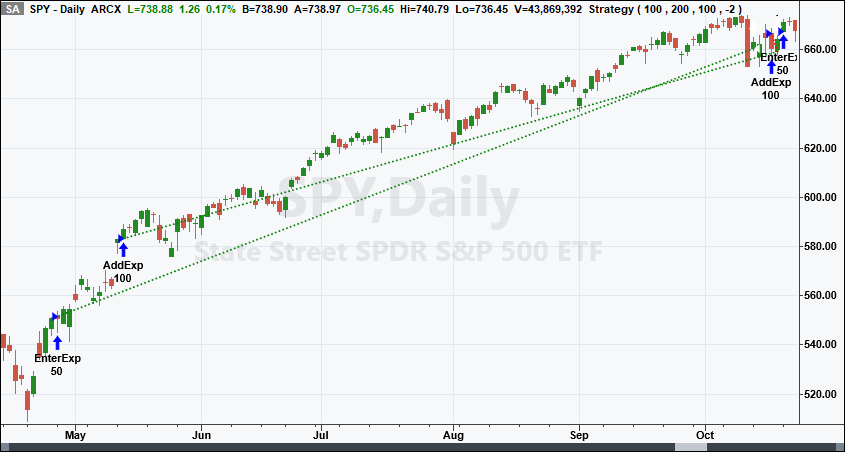
FIGURE 1: TRADESTATION. A TradeStation daily chart of SPY illustrates the strategy in action for a portion of 2025. The other five data streams are applied but hidden.
This article is for informational purposes. No type of trading or investment recommendation, advice, or strategy is being made, given, or in any manner provided by TradeStation Securities or its affiliates.
—John Robinson
TradeStation Securities, Inc.
www.TradeStation.com
BACK TO LIST

MetaStock: July 2026
Gaetano Di Prima and Fabio Baruffa’s article in the May 2026 issue, “Market Regime Identification Using Trend, Volatility, And Credit Conditions,” introduces a new method to dynamically adjust equity exposure based on a market risk assessment. The formula in MetaStock for the assessment is as follows:
{Market Regime Indentification}
{by Gaetano Di Prima & Fabio Baruffa, PhD}
{Interpretation:
 3 = Risk On
 2 = Caution
 1 OR 0 = Risk Off

! Requires data access to all listing instruments
}
spy:= security("ONLINE:SPY", C);
vix:= security("ONLINE:.VIX", C);
vix3m:= security("ONLINE:.VIX3M", C);
hyg:= security("ONLINE:HYG", C);
ief:= security("ONLINE:IEF.O", C);
Trend:= spy > Mov(spy, 200, S);
volatile:= (vix / vix3m) < 1;
zData:= hyg / ief;
zScore:= (zData - Mov(zData, 100, S))/Stdev(zData, 100);
credit:= zScore > -2;
Trend + volatile + credit
Please note that the formula references online data from other instruments. The user must have access to that data for the formula to work. The user can also choose to direct the formula to use local data by changing the “ONLINE:” part of the code to the local data format and directory path. For example, if the user wanted to use our MSLocal data format and stored the data of the SPY in C:\My Data, they would change this line:
spy:= security("ONLINE:SPY", C);
to this:
spy:= security("MSLOCAL: C:\My Data \SPY", C);
—William Golson
MetaStock Technical Support
www.MetaStock.com
BACK TO LIST

Wealth-Lab.com: July 2026
In the May 2026 article “Market Regime Identification Using Trend, Volatility, And Credit Conditions” by Gaetano Di Prima and Fabio Baruffa, a three-factor market classification framework is presented using trend, volatility, and credit conditions to identify risk-on, caution, and risk-off environments.
This Traders’ Tip demonstrates how easily the framework can be implemented in Wealth-Lab using built-in indicators, synchronized market data, and integrated chart visualizations. Wealth-Lab already includes indicators such as ZScore, SMA, and synchronized multi-symbol data handling, eliminating the need to manually recreate these calculations in Python or external analytics frameworks. In addition, Wealth-Lab’s integrated plotting and visualization capabilities allow regime conditions to be displayed directly on the chart without requiring external visualization libraries.
The implementation begins by loading SPY and calculating its 200-day simple moving average to determine the long-term trend regime. Volatility conditions are measured using VIX and VIX3M, while credit conditions are evaluated using the HYG/IEF ratio and a 100-bar ZScore. When all three conditions are favorable, the chart background is colored green to indicate a risk-on environment. Mixed conditions produce an olive caution regime, while unfavorable conditions produce a red risk-off regime.
using WealthLab.Backtest;
using System;
using WealthLab.Core;
using WealthLab.Data;
using WealthLab.Indicators;
using System.Collections.Generic;

namespace WealthScript2
{
    public class MyStrategy : UserStrategyBase
    {
        //create indicators and other objects here, this is executed prior to the main trading loop
        public override void Initialize(BarHistory bars)
        {
            StartIndex = 200;

            //Get SPY and its 200 day SMA
            spy = GetHistoryUnsynched("SPY", bars.Scale);
            spySMA = SMA.Series(spy.Close, 200);
            spy = BarHistorySynchronizer.Synchronize(spy, bars);
            spySMA = TimeSeriesSynchronizer.Synchronize(spySMA, bars);
            PlotBarHistory(spy, "SPY", WLColor.SteelBlue);
            PlotTimeSeries(spySMA, "SPY(SMA(200))", "SPY", WLColor.Red);

            //get the volatility indices
            vix = GetHistory(bars, "VIX");
            vix3m = GetHistory(bars, "VIX3M");
            PlotTimeSeries(vix.Close, "VIX", "VIX", WLColor.Blue);
            PlotTimeSeries(vix3m.Close, "VIX3M", "VIX", WLColor.Red);

            //get ratio of HYG to IEF
            BarHistory hyg = GetHistory(bars, "HYG");
            BarHistory ief = GetHistory(bars, "IEF");
            TimeSeries ratio = hyg.Close / ief.Close;
            z = ZScore.Series(ratio, 100);
            PlotIndicator(z, WLColor.CadetBlue, PlotStyle.Line);
        }

        //execute the strategy rules here, this is executed once for each bar in the backtest history
        public override void Execute(BarHistory bars, int idx)
        {
            //determine regime on this bar
            bool smaFilter = spy[idx] > spySMA[idx];
            bool vixFilter = vix[idx] < vix3m[idx];
            bool zFilter = z[idx] > -2;

            //risk ON
            if (smaFilter && vixFilter && zFilter)
                SetBackgroundColor(bars, idx, WLColor.Green.MakeTransparent(64));

            //caution
            else if ((smaFilter && vixFilter && !zFilter) || (smaFilter && !vixFilter && zFilter) || (!smaFilter && vixFilter && zFilter))
                SetBackgroundColor(bars, idx, WLColor.Olive.MakeTransparent(64));

            //risk OFF
            else
                SetBackgroundColor(bars, idx, WLColor.Red.MakeTransparent(64));
        }

        //declare private variables below
        private BarHistory spy;
        private TimeSeries spySMA;
        private BarHistory vix;
        private BarHistory vix3m;
        private TimeSeries vixRatio;
        private ZScore z;
    }
}
Figure 2 shows the Wealth-Lab implementation applied to SPY, with regime conditions visualized directly on the chart background.
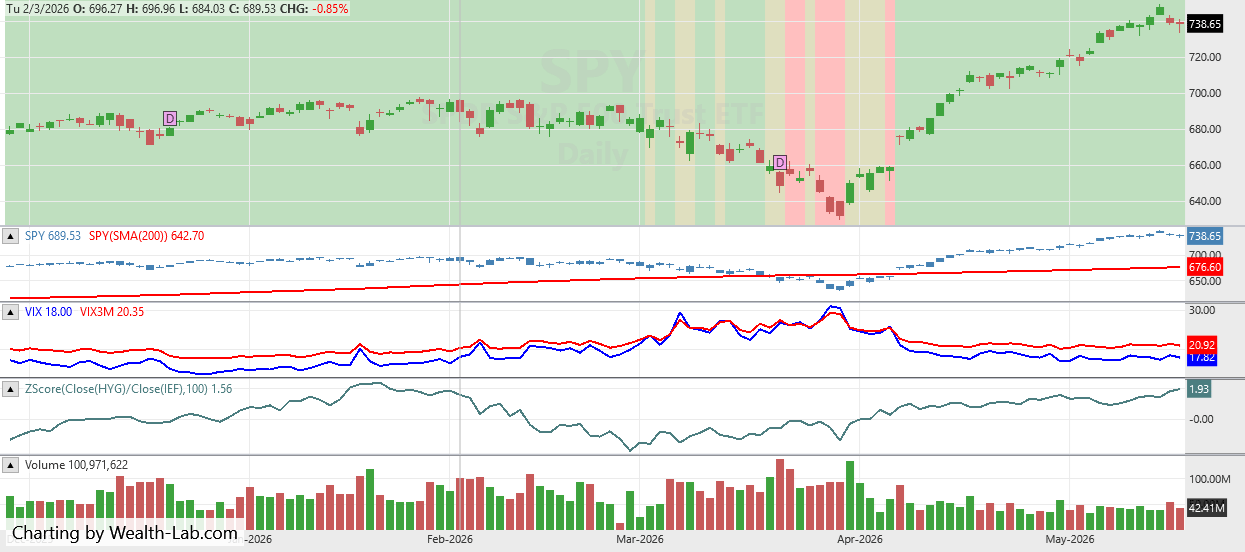
FIGURE 2: WEALTH-LAB. The example chart shows the technique applied to SPY, with regime conditions displayed in the chart background. In the lower panes, the analysis displays a 200-day simple moving average, VIX and VIX3M, and a 100-bar ZScore of the HYG/IEF ratio.
—Dion Kurczek
Founder of Wealth-Lab
www.wealth-lab.com
BACK TO LIST

NinjaTrader: July 2026
In “Market Regime Identification Using Trend, Volatility, And Credit Conditions” in the May 2026 issue, Gaetano Di Prima and Fabio Baruffa present a framework for evaluating market conditions.
An implementation of the authors’ technique is available for download at the following link for NinjaTrader 8:
Once the file is downloaded, you can import it into NinjaTrader 8 from within the control center by selecting Tools → Import → NinjaScript Add-On and then selecting the downloaded file for NinjaTrader 8.
You can review the source code in NinjaTrader 8 by selecting the menu New → NinjaScript Editor → Strategies folder from within the control center window and selecting the file.
A sample chart is shown in Figure 3.
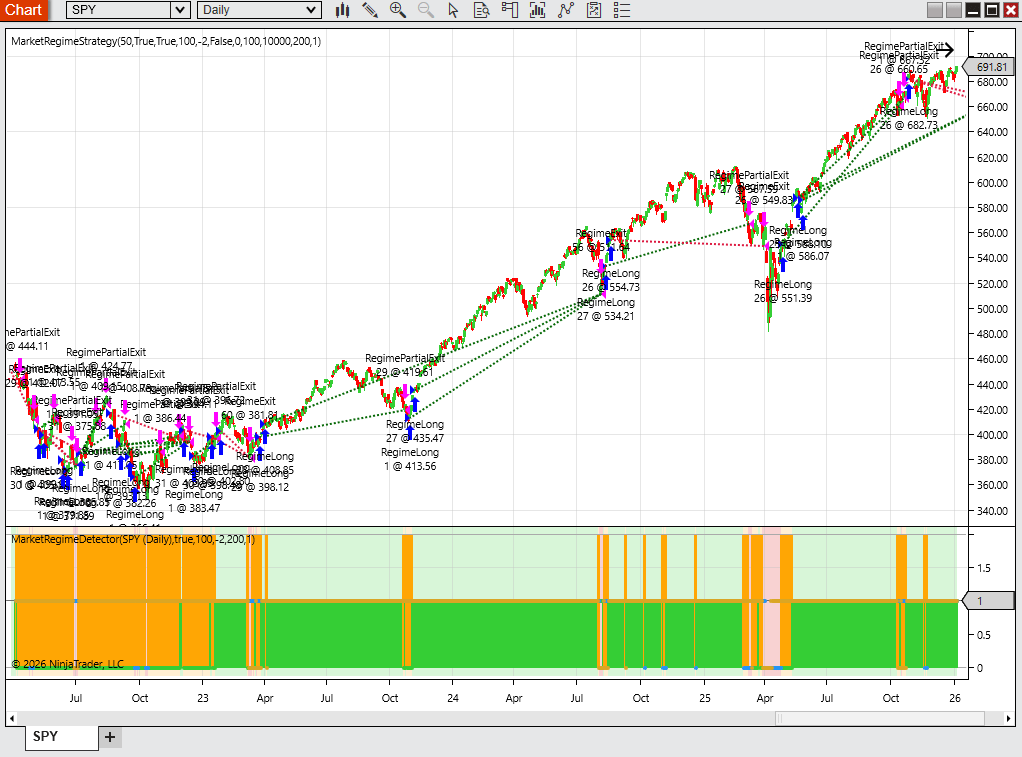
FIGURE 3: NINJATRADER. The strategy is demonstrated on a daily chart of SPY, with regime indications displayed.
NinjaScript uses compiled DLLs that run native, not interpreted, to provide you with the highest performance possible.
—NinjaTrader_ChelseaB.
NinjaTrader, LLC
www.ninjatrader.com
BACK TO LIST

RealTest: July 2026
Provided here is coding for use in the RealTest platform to implement the technique described by Gaetano Di Prima and Fabio Baruffa in their article in the May 2026 issue, “Market Regime Identification Using Trend, Volatility, And Credit Conditions” in the May 2026 issue.
Notes:
	Gaetano Di Prima & Fabio Baruffa, PhD
	"Risk-On, Risk-Off, Or Caution:
	Market Regime Identification Using Trend, Volatility, And Credit Conditions"
	TASC July 2026

	Three-component market regime model for SPY:
	1. Trend:    SPY > 200-day SMA              (favorable when true)
	2. Vol:      VIX < VIX3M (contango)         (favorable when true)
	3. Credit:   100-day Z-score of HYG/IEF >= -2 (favorable when true)

	Aggregation (matches Figure 4 in the article):
	  all 3 true    -> Risk ON   -> 100% SPY exposure
	  exactly 1 false (2 true) -> Caution -> 50% SPY exposure
	  2 or 3 false  -> Risk OFF  ->   0% SPY exposure

	The regime signal is generated at Friday's close (EndOfWeek) and the
	position is rebalanced at Monday's open via DynamicSizing.

Import:
	DataSource:	Norgate
	IncludeList:	SPY, $VIX, $VIX3M, HYG, IEF
	StartDate:	2006-01-01 // buffer for 200d SMA and 100d Z-score (HYG starts 2007-04-11)
	EndDate:	Latest
	SaveAs:	spy_regime.rtd
	Adjustment:	Capital // split-adjusted; dividends paid as cash

Settings:
	DataFile:	spy_regime.rtd
	StartDate:	Earliest
	EndDate:	Latest
	BarSize:	Daily
	AccountSize:	10000 // matches article's initial capital
	KeepTrades:	Strategy,Benchmark

Parameters:
	TrendLen:	200 // SMA length for SPY trend filter
	ZLen:	100 // rolling window for HYG/IEF Z-score
	ZThresh:	-2 // credit regime threshold
	CautionPct:	50 // exposure (%) when one signal disagrees

Data:
	// --- Trend regime: SPY > SMA(200) ---
	spy_close:	Extern($SPY, C)
	spy_sma:	Extern($SPY, MA(C, TrendLen))
	cond_trend:	spy_close > spy_sma

	// --- Volatility regime: VIX / VIX3M < 1 (contango) ---
	vix:	Extern($$VIX, C)
	vix3m:	Extern($$VIX3M, C)
	cond_vol:	vix < vix3m

	// --- Credit regime: Z-score of HYG/IEF > -2 ---
	hyg_close:	Extern($HYG, C)
	ief_close:	Extern($IEF, C)
	credit_ratio:	hyg_close / ief_close
	credit_ma:	MA(credit_ratio, ZLen)
	credit_sd:	StdDev(credit_ratio, ZLen)
	credit_z:	IF(credit_sd > 0, (credit_ratio - credit_ma) / credit_sd, 0)
	cond_credit:	credit_z > ZThresh

	// --- Regime aggregation ---
	true_count:	cond_trend + cond_vol + cond_credit
	regime:	Select(true_count = 3, 1, true_count = 2, 2, 0) // 1=ON, 2=Caution, 0=OFF

	// --- Target equity exposure for SPY ---
	target_pct:	Select(regime = 1, 100, regime = 2, CautionPct, 0)

	// --- Rebalance trigger ---
	rebalance:	Symbol = $SPY and EndOfWeek and not IsNan(credit_z)

Strategy: SPY_Regime
	DynamicSizing:	True
	QtyType:	Percent
	// At EndOfWeek (Friday close), set target SPY exposure for next Monday's open.
	// NaN on every other bar/symbol = "no change", which preserves the current position.
	Quantity:	IF(Symbol = $SPY and rebalance, target_pct, nan)

Benchmark: SPY_BuyHold
	Side:	Long
	QtyType:	Percent
	Quantity:	100
	// Enter on the first bar where all regime inputs are valid - so the benchmark
	// equity curve aligns with the strategy's earliest possible trade date.
	EntrySetup:	Symbol = $SPY and not IsNaN(credit_z) and IsNaN(credit_z[1])
	ExitRule:	FALSE
—Marsten Parker
MHP Trading
mhp@mhptrading.com
BACK TO LIST

TradingView: July 2026
The TradingView Pine Script code presented here implements the regime positioning system described by Gaetano Di Prima and Fabio Baruffa in their May 2026 article, “Market Regime Identification Using Trend, Volatility, And Credit Conditions.”
//  TASC Issue: July 2026
//     Article: Risk-On, Risk-Off, Or Caution
//              Market Regime Identification
//              Using Trend, Volatility, And
//              Credit Conditions
//  Article By: Gaetano Di Prima and Fabio Baruffa
//    Language: TradingView's Pine Script® v6
// Provided By: PineCoders, for tradingview.com

//@version=6

TITLE = "TASC 2026.07 Risk-On, Risk-Off, Or Caution"
SHORTTITLE = "Regime Positioning"

strategy(
    TITLE,
    SHORTTITLE,
    slippage = 3,
    initial_capital = 10000)

// Raise an error if the script is not running on
// a daily SPY chart.
if syminfo.ticker != "SPY" or timeframe.period != "1D"
    runtime.error(
        "This strategy requires a daily SPY chart."
    )


//#region --- Data requests ---

float vix   = request.security("VIX",   "", close)
float vix3m = request.security("VIX3M", "", close)
float spx   = request.security("SPX",   "", close)
float hyg   = request.security("HYG",   "", close)
float ief   = request.security("IEF",   "", close)
//#endregion


//#region --- Regime signals ---

// @variable Difference between SPX value & its 200-bar SMA.
float spxDist = spx - ta.sma(spx, 200)

// @variable The ratio of the VIX value to the VIX3M value.
float ts = vix / vix3m

// @variable The ratio of the HYG value to the IEF value.
float creditRatio = hyg / ief
// @variable The 100-bar z-score of the 'creditRatio' value.
float creditZscore = (
    (creditRatio - ta.sma(creditRatio, 100))
    / ta.stdev(creditRatio, 100)
)

// @variable 'true' if SPX is above the SMA, uptrend.
bool s1 = spxDist > 0.0
// @variable 'true' if VIX is below VIX3M, "stable" risk.
bool s2 = ts < 1.0
// @variable 'true' if 'creditZscore' value is above -2.
bool s3 = creditZscore > -2.0

// @variable Regime signal: "Risk ON","Caution","Risk OFF"
int regime = (s1 ? 1 : 0) + (s2 ? 1 : 0) + (s3 ? 1 : 0)

// @variable The background color for regime signal states.
color rColor = switch regime
    3 => #4caf5033
    2 => #ffeb3b33
    =>   #ff525233
//#endregion


//#region --- Order logic ---

// This strategy places orders to adjust the
// current position only at the close of each week.

// @variable 'true' if the bar is the last of the week.
bool isEow = time_close == time_close("W")

if isEow and barstate.isconfirmed
    // @variable The target position size for reallocation.
    float targetPosition = switch regime
        3 => strategy.equity        // 100% for "Risk ON"
        2 => 0.5 * strategy.equity  // 50% for "Caution"
        =>   0.0                    // 0% for "Risk OFF"

    // @variable The shares to add to or remove.
    float diff = math.floor(
        targetPosition / close - strategy.position_size
    )
    // Modify the position if 'diff' is nonzero.
    switch
        diff > 0 =>
            strategy.order("Buy", strategy.long, diff)
        diff < 0 =>
            strategy.close("Buy", "Sell", -diff)
//#endregion


//#region --- Display ---

// Legend display
if barstate.isfirst
    table tbl = table.new(position.bottom_center, 1, 3)
    tbl.cell(
        row = 0,
        column = 0,
        text = "🟩 Risk ON\n🟥 Risk OFF\n🟨 Caution",
        text_color = #ffffff,
        text_halign = text.align_left,
        bgcolor = #363a4580
    )

// Chart background highlight
bgcolor(
    rColor,
    title = "Regime highlight",
    force_overlay = true
)

// Signal plots
plot(
    s1 ? 1 : na,
    title = "Trend signal",
    color = #00a2ff,
    style = plot.style_columns
)

plot(
    s2 ? 2 : na,
    title = "Volatility signal",
    color = #015f96,
    style = plot.style_columns,
    histbase = 1.1
)

plot(
    s3 ? 3 : na,
    title = "Credit signal",
    color = #00314d,
    style = plot.style_columns,
    histbase = 2.1
)
//#endregion
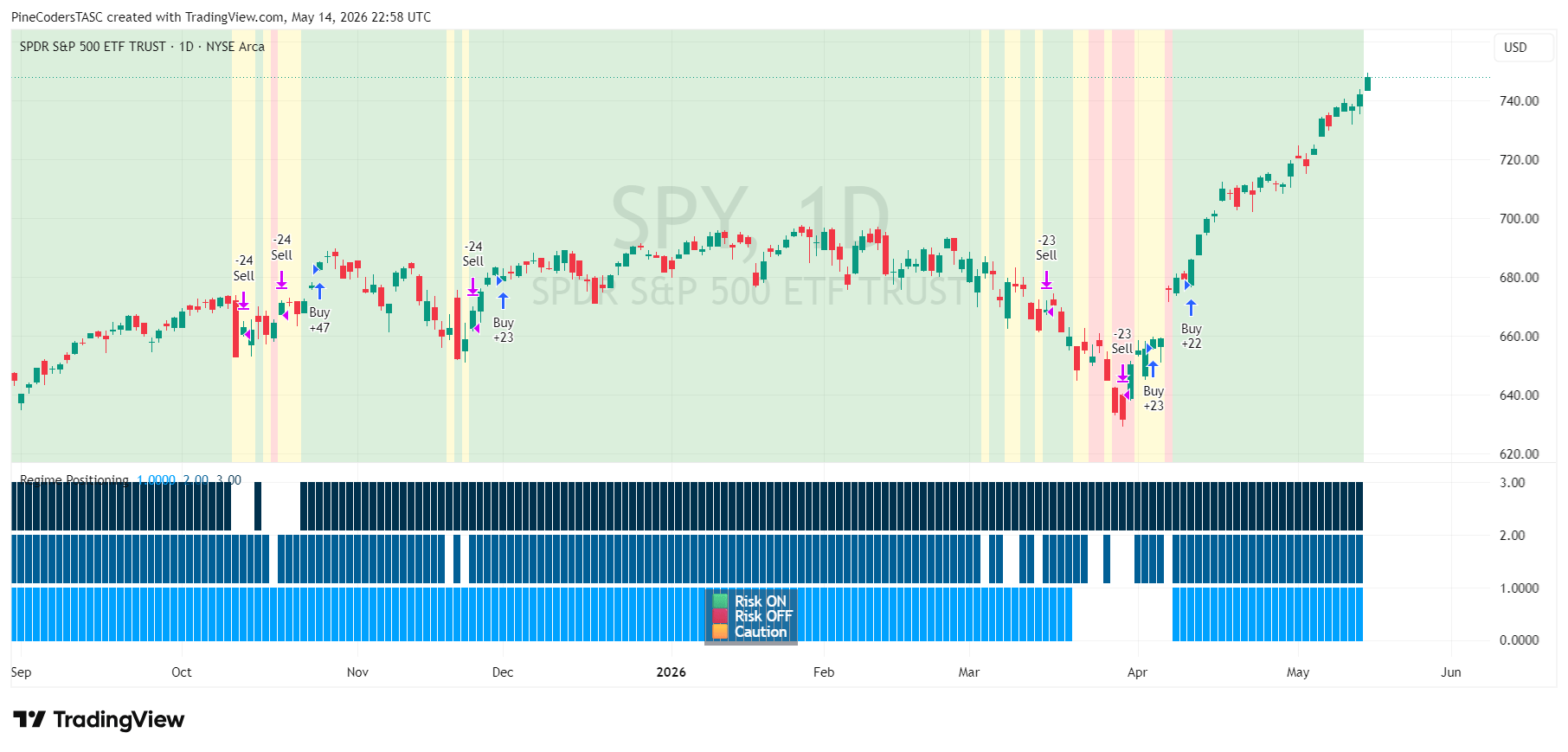
FIGURE 4: TRADINGVIEW. Here you an example of the regime positioning system implemented on a daily chart of SPY. The regimes are indicated in the background of the chart with green, red, and yellow vertical highlights while the lower panel displays the associated positioning.
The script is available on TradingView from the PineCodersTASC account: https://www.tradingview.com/u/PineCodersTASC/#published-scripts.
—PineCoders, for TradingView
https://www.tradingview.com
BACK TO LIST

Neuroshell Trader: July 2026
The market regime identification strategy presented by Gaetano Di Prima and Fabio Baruffa in their article, “Market Regime Identification Using Trend, Volatility, And Credit Conditions” in the May 2026 issue, can be easily implemented in NeuroShell Trader. Select “New trading strategy...” from the insert menu and enter the following in the appropriate locations of the trading strategy wizard:
BUY LONG CONDITIONS: [All of which must be true]
     A>B(SPY Close,Avg(SPY Close,200))
     A<B(Divide(VIX 30-Day Volatility Index Close,3-Month VIX Close),1)
     A>B(StndNormZScore(Divide(High Yield Corporate Bond ETF Close,7-10 Year Treasury ETF Close),100),-2)
     Friday Flag(Date)

SELL LONG CONDITIONS: [All of which must be true]
     A<=B(SPY Close,Avg(SPY Close,200))
     A>=B(Divide(VIX 30-Day Volatility Index Close,3-Month VIX Close),1)
     A<=B(StndNormZScore(Divide(High Yield Corporate Bond ETF Close,7-10 Year Treasury ETF Close),100),-2)
     Friday Flag(Date)
After entering the system conditions, you can also choose whether the parameters should be optimized. After backtesting the trading strategy, use the “Detailed analysis...” button to view the backtest and trade-by-trade statistics for the system.
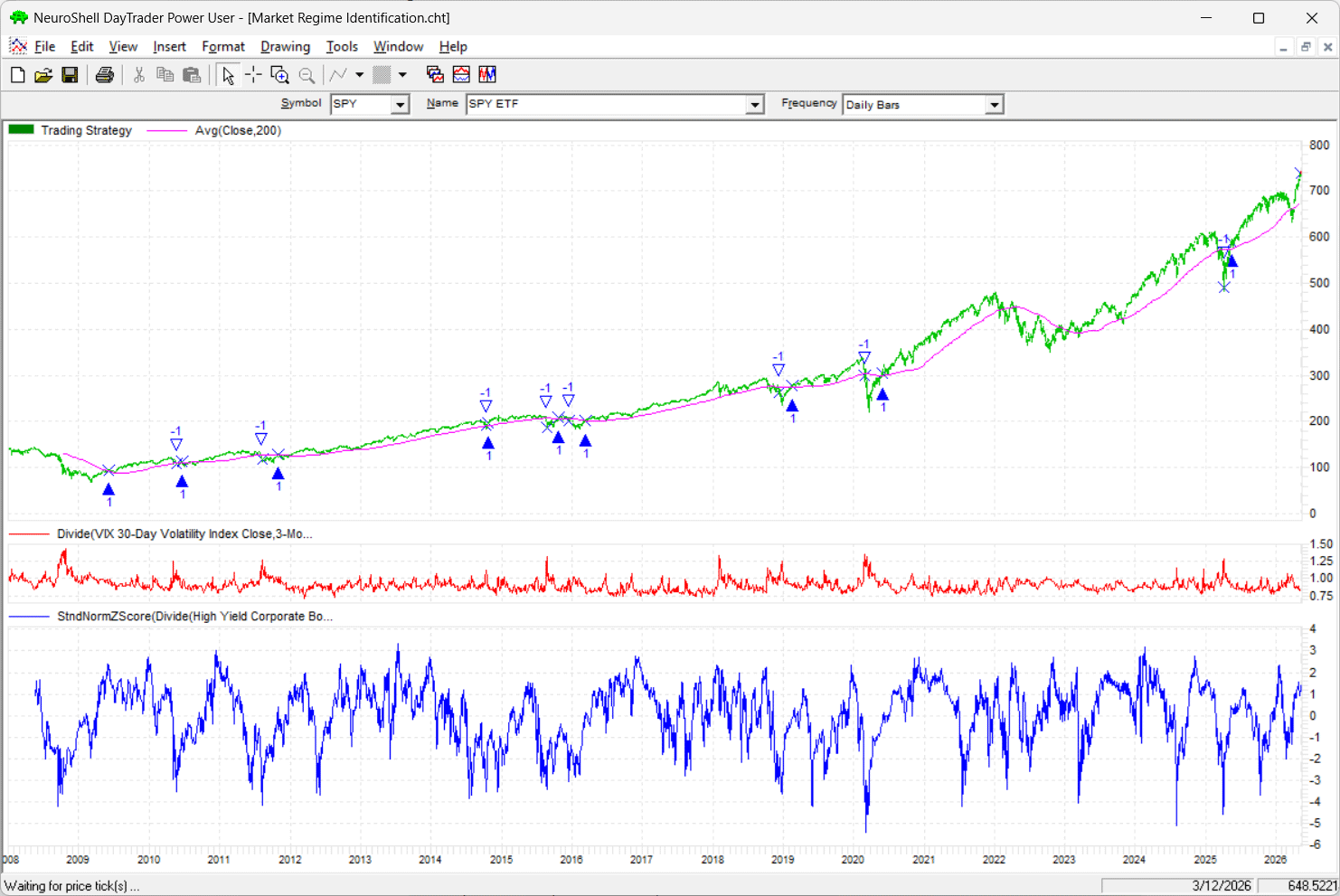
FIGURE 5: NEUROSHELL TRADER. This NeuroShell Trader chart demonstrates the market regime identification system on SPY from 2008 through a portion of 2026.
Users of NeuroShell Trader can go to the Stocks & Commodities section of the NeuroShell Trader free technical support website to download a copy of this or any previous Traders’ Tips.
—Ward Systems Group, Inc.
sales@wardsystems.com
www.neuroshell.com
BACK TO LIST

The Zorro Project: July 2026
Markets change all the time. Sometimes it trends, sometimes it oscillates, sometimes it goes sideward. Trading systems that do not consider market regime change will bring uncomfortable times for their traders.
In their article “Market Regime Identification Using Trend, Volatility, And Credit Conditions” that appeared in the May 2026 issue, Gaetano Di Prima and Fabio Baruffa provide a solution. Their market regime filter consists of three components for detecting trend, volatility, and credit spread.
I did not want to convert the long Python code listing from their article (and neither did Claude or ChatGPT), so I programmed the three detectors from scratch, which took me only five minutes. Here is the code:
int marketDir(int TimePeriod)
{
  asset("SPY");
  return priceC() > SMA(seriesC(),TimePeriod);
}

int marketVolatility()
{
  return assetPrice("VIX") < assetPrice("VIX3M");
}

var marketCC(int TimePeriod)
{
  var Ratio = assetPrice("HYG")/fix0(assetPrice("IEF"));
  return zscore(Ratio,TimePeriod);
}
The assetPrice function is a helper function that returns the current price of an asset and then switches back to the original asset. The fix0 function prevents division by zero, just in case. The first two functions return “1” when the condition is fulfilled, otherwise “0.”
The authors consider the market in a favorable state when all three detectors give the green light. If only two do, trading should be done with caution, and otherwise, it should be entirely suspended, according to their system.
Here is the code to plot a green, orange, or red bar depending on the market state:
function run()
{
  BarPeriod = 1440;
  StartDate = 2008;
  EndDate = 2026;
  LookBack = 200;
  setf(PlotMode,PL_ALL);
   assetList("AssetsIB");

  int Score = marketDir(200)
    + marketVolatility()
    + (marketCC(100) > -2);

plot("#0",0,NEW,WHITE); // plot in a new window
  if(Score == 3)
    plot("On",1,BARS,GREEN);
  else if(Score == 2)
    plot("Caution",1,BARS,ORANGE);
  else
    plot("Risk",1,BARS,RED);}
}
The resulting chart is shown in Figure 6.
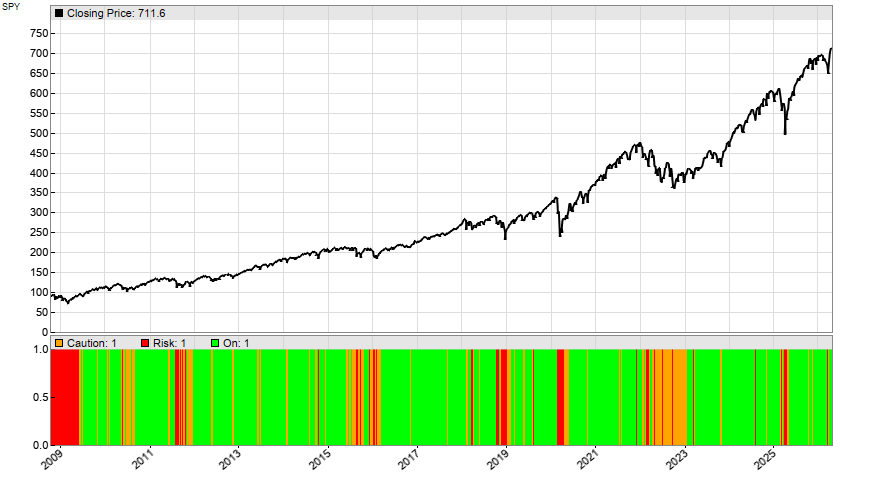
FIGURE 6: ZORRO. Here is an example of the market regime filter plotted on a chart of SPY, 2009–present.
Next, we can put the market detector to the test. We invest all capital in SPY when the market is in a green state, half the capital in an orange state, and go out of the market in a red state. For this we add this code to the run function:
asset("SPY");
Capital = 10000;
Leverage = 1;
int Exposure = (Capital+ProfitTotal)/MarginCost;
if(Score < 3) Exposure /= 2;
if(Score < 2) Exposure = 0;
if(Exposure > LotsPool)
  enterLong(Exposure-LotsPool);
else if(Exposure < LotsPool)
  exitLong(0,0,LotsPool-Exposure);
The backtest replicates the results from the article, with 8% CAGR and 18% drawdown (see Figure 7).
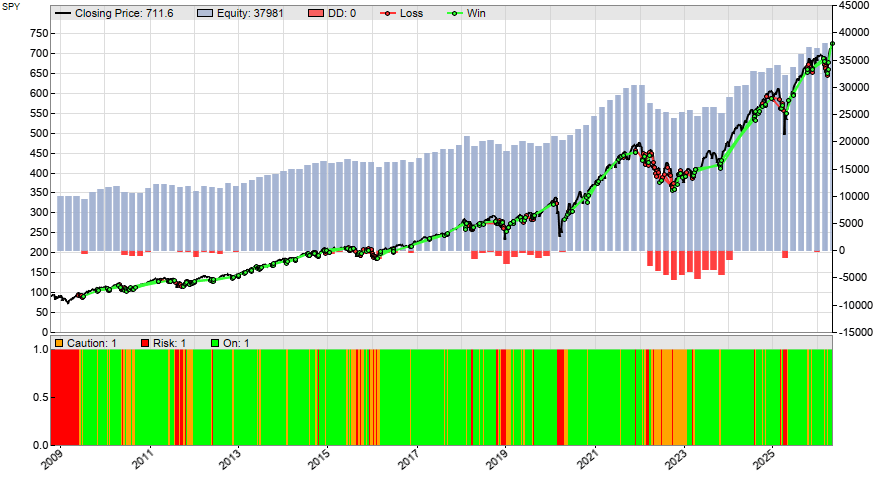
FIGURE 7: ZORRO. A backtest of the filter gives the CAGR and drawdown metrics, plotted here on a chart.
The 8% return is good, but not too exciting. However, drawdown and risk are remarkably smaller than with a buy-and-hold strategy.
The code can be downloaded from the 2026 script repository on https://financial-hacker.com. The Zorro platform can be downloaded from https://zorro-project.com.
—Petra Volkova
The Zorro Project by oP group Germany
https://zorro-project.com
BACK TO LIST

AIQ: July 2026
AIQ code is provided in an EDS downloadable code file based on the article, “Market Regime Identification Using Trend, Volatility, And Credit Conditions” in the May 2026 issue by Gaetano Di Prima and Fabio Baruffa. The EDS file is available on request from me at rdencpa@gmail.com. The code listing is also shown here.
The EDS file can be used to indicate the status of the market according to the authors’ concepts. The file should be run on a list containing only one symbol, SPY (SPDR S&P 500 ETF Trust).
! "Market Regime Identification", TASC July 2026
! Authors: Gaetano Di Prima & Fabio Baruffa, PhD
! Coded by: Richard Denning, 5/7/2026

C is [close].

SMA200 is simpleavg(C,200).
VIXc is tickerUDF("VIX", C).
VIX_3M is simpleavg(VIXc, 3*21).
HYGc is tickerUDF("HYG",C).
IEFc is tickerUDF("IEF", C).

CreditR is HYGc / IEFc.
CRsma is simpleavg(CreditR,100).
StdCRsma is sqrt(variance(CreditR, 100)).
ZCR is (CreditR - CRsma) / StdCRsma.

Signal_1 if C > SMA200.
Exit_1 if C <= SMA200.
Signal_2 if VIXc < Vix_3M.
Exit_2 if VIXc >= Vix_3M.
Signal_3 if ZCR > -2.
Exit_3 if ZCR < -2.

Trend is Signal_1.
Volatility is Signal_2.
Credit is signal_3.
TotSignal is Trend + Volatility + Credit.

Pct_Invested is iff(TotSignal = 3, 100,iff(TotSignal = 2, 50, 0)).

Status if 1.
Figure 8 shows an example of market regime indications on three different dates.
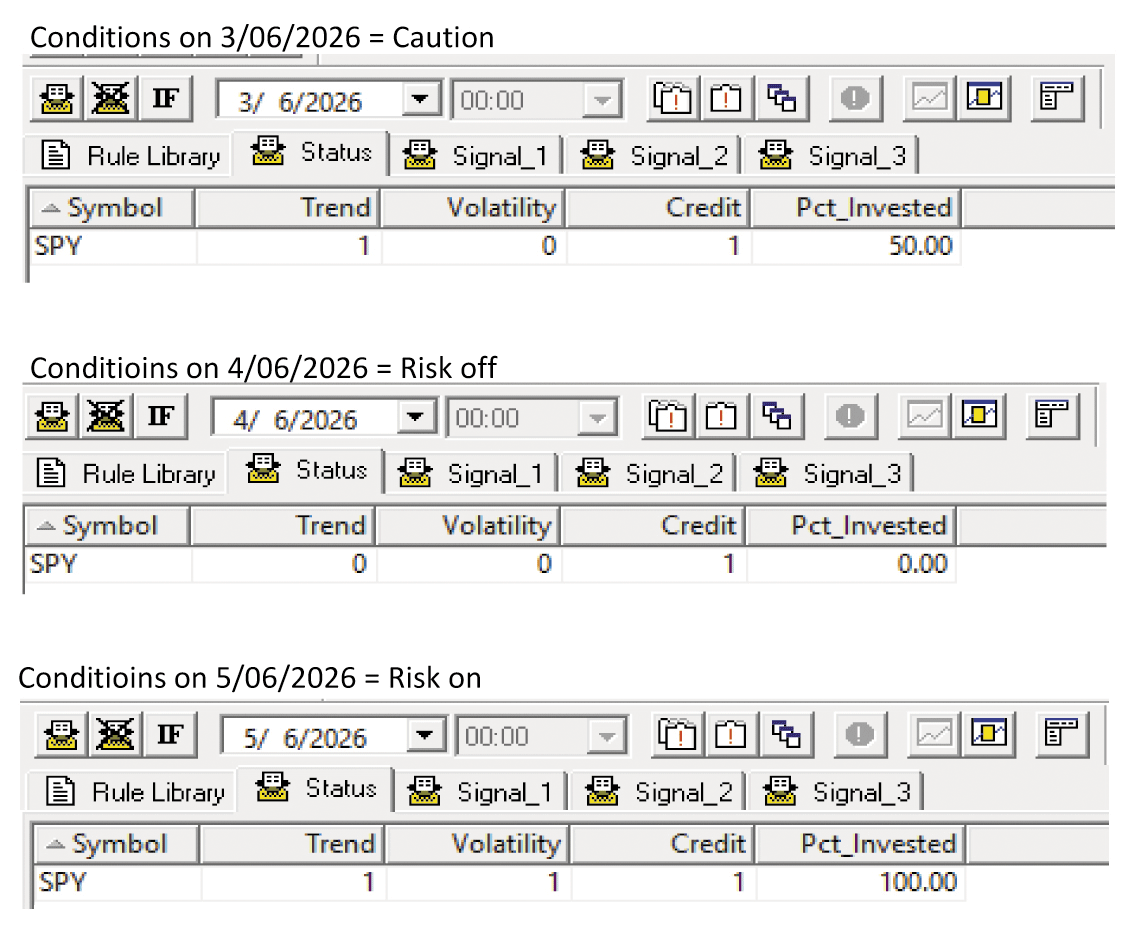
FIGURE 8: AIQ. This shows an example of market regime indications on three different dates for the SPY.
—Richard Denning
For AIQ Systems
rdencpa@gmail.com
BACK TO LIST
Originally published in the July 2026 issue of
Technical Analysis of STOCKS & COMMODITIES magazine.
All rights reserved. © Copyright 2026, Technical Analysis, Inc.