TRADERS’ TIPS
June 2026

For this month’s Traders’ Tips, the focus is Dion Kurczek’s article in this issue, “One Percent A Week: A High-Probability Weekly Trading Strategy For TQQQ, Part 2: Variations And Community Enhancements.” Here, we present the June 2026 Traders’ Tips code with possible implementations in various software.
You can right-click on any chart to open it in a new tab or window and view it at it’s originally supplied size, often much larger than the version printed in the magazine.
Wealth-Lab code is also provided in the article, which S&C subscribers will find in the Article Code section of our website here.
The Traders’ Tips section is provided to help the reader implement a selected technique from an article in this issue or another recent issue. The entries here are contributed by software developers or programmers for software that is capable of customization.

TradeStation: June 2026
In “One Percent A Week: A High-Probability Weekly Trading Strategy For TQQQ, Part 2: Variations And Community Enhancements” in this issue, Dion Kurczek moves the strategy away from the original 1% dip entry and toward a weekly model with more adaptive exits.
The EasyLanguage implementation here raises the profit target when the trade moves in its favor, exits early if strength fades on the next trading day, attempts a recovery exit on weak losing bars, uses a stop for the defined loss exit, and retains the Friday end-of-week exit.
{
	TASC JUNE 2026
	One Percent A Week: A High-Probability Weekly
	Trading Strategy For TQQQ
	Part 2: Variations And Community Enhancements
	Dion Kurczek
}

inputs:
	FirstDayStrengthPct( 2.0 ),
	NextDayWeakPct( 3.0 ),
	TargetMult( 1.07 ),
	ExpansionTriggerPct( 0.3 ),
	ExpansionMult( 1.011 ),
	RecoveryExitMult( 1.025 ),
	LossArmPct( -1.3 ),
	HardLossMult( 0.985 );

variables:
	DayOfTradeWeek( 0 ),
	EntryDayOfTradeWeek( 0 ),
	ProfitPct( 0 ),
	TargetPrice( 0 ),
	FirstDayStrong( false ),
	MP( 0 );

MP = MarketPosition;

if CurrentBar = 1 then
begin
	DayOfTradeWeek = 1;
	EntryDayOfTradeWeek = 0;
	FirstDayStrong = false;
end
else
begin
	if DayOfWeek( Date ) < DayOfWeek( Date[1] ) then
	begin
		DayOfTradeWeek = 1;
		EntryDayOfTradeWeek = 0;
		FirstDayStrong = false;
	end
	else if Date <> Date[1] then
		DayOfTradeWeek = DayOfTradeWeek[1] + 1
	else
		DayOfTradeWeek = DayOfTradeWeek[1];
end;

if MP = 0 and DayOfWeek( Date ) <> 1
 and DayOfWeek( Date Next Bar ) = 1 then
begin
	Buy ( "WeekIn" ) next bar at market;
end
else if MP = 1 then
begin
	if MP[1] <> 1 then
	begin
		EntryDayOfTradeWeek = DayOfTradeWeek;
		FirstDayStrong = false;
	end;

	ProfitPct = 100 * ( ( Close / EntryPrice ) - 1 );

	if DayOfTradeWeek = EntryDayOfTradeWeek
	 and ProfitPct > FirstDayStrengthPct then
		FirstDayStrong = true;

	if DayOfTradeWeek = EntryDayOfTradeWeek + 1 and
	   FirstDayStrong and
	   ProfitPct < NextDayWeakPct then
		Sell ( "MomFail" ) next bar at market
	else if ProfitPct <= LossArmPct then
		Sell ( "HardLoss" ) next bar
		 at EntryPrice * HardLossMult stop
	else if ProfitPct > 0 then
	begin
		TargetPrice = EntryPrice * TargetMult;

		if ProfitPct > ExpansionTriggerPct then
			TargetPrice = TargetPrice * ExpansionMult;

		Sell ( "Target" ) next bar at TargetPrice limit;
	end
	else if DayOfTradeWeek > EntryDayOfTradeWeek
	 and Close < Open then
		Sell ( "Recovery" ) next bar
		 at EntryPrice * RecoveryExitMult limit
	else if DayOfTradeWeek > EntryDayOfTradeWeek then
		Sell ( "BrkEven" ) next bar at EntryPrice limit;

	if DayOfWeek( Date ) = 5 then
		SetExitOnClose;
end;
A sample chart is shown in Figure 1.
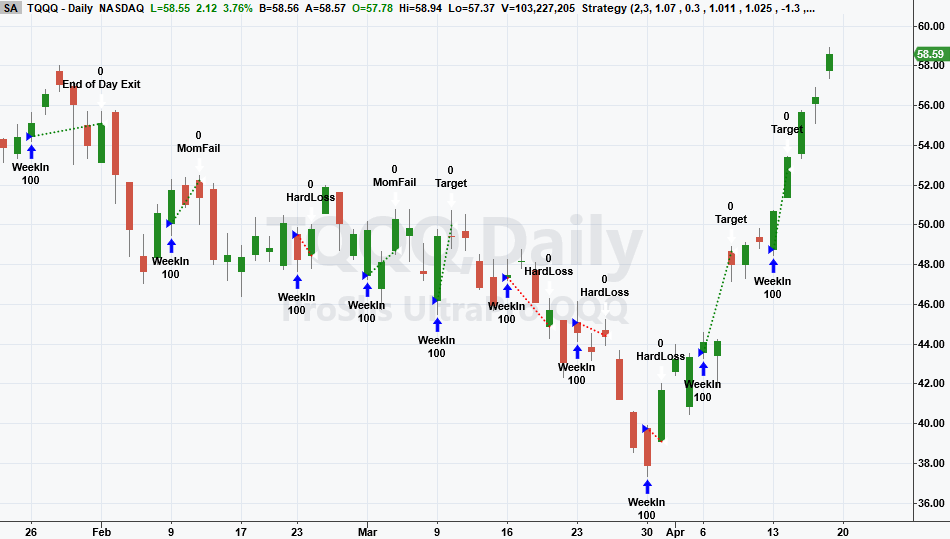
FIGURE 1: TRADESTATION. A daily chart of TQQQ illustrates the strategy in action for a portion of 2026.
This article is for informational purposes. No type of trading or investment recommendation, advice, or strategy is being made, given, or in any manner provided by TradeStation Securities or its affiliates.
—John Robinson
TradeStation Securities, Inc.
www.TradeStation.com
BACK TO LIST

NinjaTrader: June 2026
In “One Percent A Week: A High-Probability Weekly Trading Strategy For TQQQ, Part 2: Variations And Community Enhancements” in this issue, Dion Kurczek presents some exit variations for the strategy he first presented in his article in the March 2026 issue. Several of the indicators discussed in the article are available for download at the following link for NinjaTrader 8:
Once the file is downloaded, you can import the indicator into NinjaTrader 8 from within the control center by selecting Tools → Import → NinjaScript Add-On and then selecting the downloaded file for NinjaTrader 8.
You can review the indicator source code in NinjaTrader 8 by selecting the menu New → NinjaScript Editor → Indicators folder from within the control center window and selecting the file.
A sample chart is shown in Figure 2.
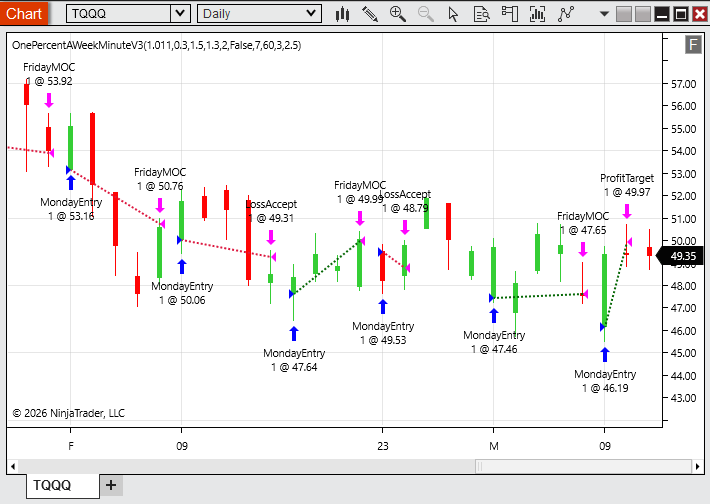
FIGURE 2: NINJATRADER. An example implementation of the trading strategy is demonstrated on a daily chart of TQQQ.
NinjaScript uses compiled DLLs that run native, not interpreted, to provide you with the highest performance possible.
—NinjaTrader_Jesse
NinjaTrader, LLC
www.ninjatrader.com
BACK TO LIST

RealTest: June 2026
Provided here is coding for use in the RealTest platform to implement some of the strategy options described by Dion Kurczek in his article in this issue, “One Percent A Week: A High-Probability Weekly Trading Strategy For TQQQ, Part 2: Variations And Community Enhancements.”
Notes:
	Dion Kurczek "One Percent A Week: A High-Probability Weekly Trading
	Strategy For TQQQ, Part 2: Variations And Community Enhancements"
	TASC June 2026
	Implements Revision 3: Adaptive Weekly Momentum Exit Model.

Import:
	DataSource:	Norgate
	IncludeList:	TQQQ, SPY
	StartDate:	2010-02-11 // first day of TQQQ
	EndDate:	Latest
	SaveAs:	TQQQ.rtd

Settings:
	DataFile:	TQQQ.rtd
	StartDate:	Earliest
	EndDate:	Latest
	BarSize:	Daily
	AccountSize:	100000

Parameters:
	MonPct:	2.0	// day-1 profit% threshold for momentum failure filter
	TuesPct:	3.0	// day-2 profit% threshold for momentum failure filter

Strategy: TQQQ_1PCT_V3
	Side:	Long
	EntrySetup:	Symbol = $TQQQ and EndOfWeek and not thisWeekEntry
	ExitLimit:	Select(BarsHeld = 0, 0, // no exit limit on entry day
			curProfit < -1.3, Reason(FillPrice * 0.985, "loss accept"),
			curProfit > 0.3, Reason(FillPrice * 1.07 * 1.011, "boosted target"),
			curProfit > 0, Reason(FillPrice * 1.07, "profit target"),
			C < O, Reason(FillPrice * 1.025, "recovery"),
			Reason(FillPrice, "breakeven"))
	ExitRule:	Select(BarsHeld = 1 and prevProfit > MonPct and curProfit < TuesPct, "MT2",
			EndOfWeek, "end of week")
	ExitTime:	ThisClose

Library:
	curProfit:	(C - FillPrice) / FillPrice * 100
	prevProfit:	(C[1] - FillPrice) / FillPrice * 100 // entry-day close profit; used at BarsHeld=1

TestData:
	thisWeekEntry:	if(EndOfWeek, 0, thisWeekEntry[1] or Extern(@TQQQ_1PCT_V3, Shares > 0))

Benchmark: SPY
	Side:	Long
	EntrySetup:	Symbol = $SPY
—Marsten Parker
MHP Trading
mhp@mhptrading.com
BACK TO LIST

TradingView: June 2026
The TradingView Pine Script code presented here implements a strategy option described in Dion Kurczek’s article in this issue, “One Percent A Week: A High-Probability Weekly Trading Strategy For TQQQ, Part 2: Variations And Community Enhancements.”
//  TASC Issue: June 2026
//     Article: Trading Snapbacks In A Leveraged ETF
//              One Percent A Week: A High-Probability
//              Weekly Trading Strategy For TQQQ - Part 2
//  Article By: Dion Kurczek
//    Language: TradingView's Pine Script® v6
// Provided By: PineCoders, for tradingview.com


//@version=6

TITLE = "TASC 2026.06 One Percent A Week - Adaptive"
SHORTTITLE = "1%/W - Adaptive"
strategy(TITLE,SHORTTITLE,
    overlay = true,
    initial_capital = 1000,
    default_qty_type = strategy.percent_of_equity,
    default_qty_value = 10,
    calc_on_order_fills = true
)

//#region Inputs

monPercent = input.float(2,
                minval = 1,
                maxval = 3,
                step = 0.1,
                title = "Monday %"
                )
tuesPercent = input.float(3,
                minval = 1,
                maxval = 5,
                step = 0.1,
                title = "Tuesday %"
                )

// #endregion

// #region Variables

var float monOpen = na
var float monProf = na
var float pt    = na
var float sl = na
var bool entrySent = false
var bool exitSent = false

nextDay = dayofweek(time("","",-1))
spap = strategy.position_avg_price
sps = strategy.position_size

bool newMon = dayofweek == dayofweek.monday and
                     session.isfirstbar_regular
bool endMon = dayofweek == dayofweek.monday and
                     session.islastbar_regular
bool endTue = dayofweek == dayofweek.tuesday and
                     session.islastbar_regular

// #endregion

// #region Friday

//EOD Closeout any positions still open
if  dayofweek == dayofweek.friday and
     sps > 0 and
     session.islastbar_regular and
     barstate.isconfirmed

    strategy.close_all("End of week", immediately = true)

//Set Order to Enter on Monday Market Open
if  nextDay == 2 and
     barstate.isconfirmed and
     session.islastbar_regular

    strategy.entry(
         "Buy",
         strategy.long,
         oca_name = "Order"
         )

    entrySent := true
    exitSent := false
    pt := na
    sl := na

// #endregion

// #region Monday, Send orders for Profit and Hard Stop

if newMon and not exitSent
    monOpen := open
    exitSent := true

    sl := spap * 0.985
    pt := spap * 1.07

    strategy.exit(
         "Exit", "Buy", stop = sl, limit = pt,
         oca_name = "Order",
         comment_profit = "Profit +7%",
         comment_loss = "Hard Stop -1.5%"
         )

// #endregion

//#region Monday EOD performance based Exit Adjustments

posProf = ((close-spap)/spap)*100

if endMon
    monProf := posProf
    if posProf > 0
        if posProf > 0.3
            pt := pt * 1.011
        strategy.exit(
         id = "Exit",
         from_entry = "Buy",
         stop = sl,
         limit = pt,
         oca_name = "Order",
         comment_profit = "Profit +11%",
         comment_loss = "Hard Stop -1.5%"
         )

    else
        pt := spap * 1.025
        strategy.exit(
         id = "Exit",
         from_entry = "Buy",
         stop = sl,
         limit = pt,
         oca_name = "Order",
         comment_profit = "Profit +2.5%",
         comment_loss = "Hard Stop -1.5%"
         )

// #endregion

//#region Tuesday EOD Check for Loss of momentum.

lom = monProf > monPercent and posProf < tuesPercent

if endTue and lom
    strategy.close_all("Loss of Momentum Exit")

//#endregion

//#region Plots

plot(newMon ? na : monOpen,
     "Monday Open", color.blue,
     style = plot.style_linebr
     )

plot(newMon or newMon[1] ? monOpen : na,
     "Monday Open", color.blue,
     style = plot.style_linebr
     )

plot(sps > 0 or sps[1] > 0 ? sl : na,
     "-1.5% Hard Stop", color.rgb(255,0,0),
     style = plot.style_linebr,
     linestyle = plot.linestyle_dashed
     )

plot(sps > 0 or sps[1] > 0 ? pt : na,
     "Profit Target", color.rgb(0,255,0),
     style = plot.style_linebr,
     linestyle = plot.linestyle_solid
     )

//#endregion
An example chart is shown in Figure 3.
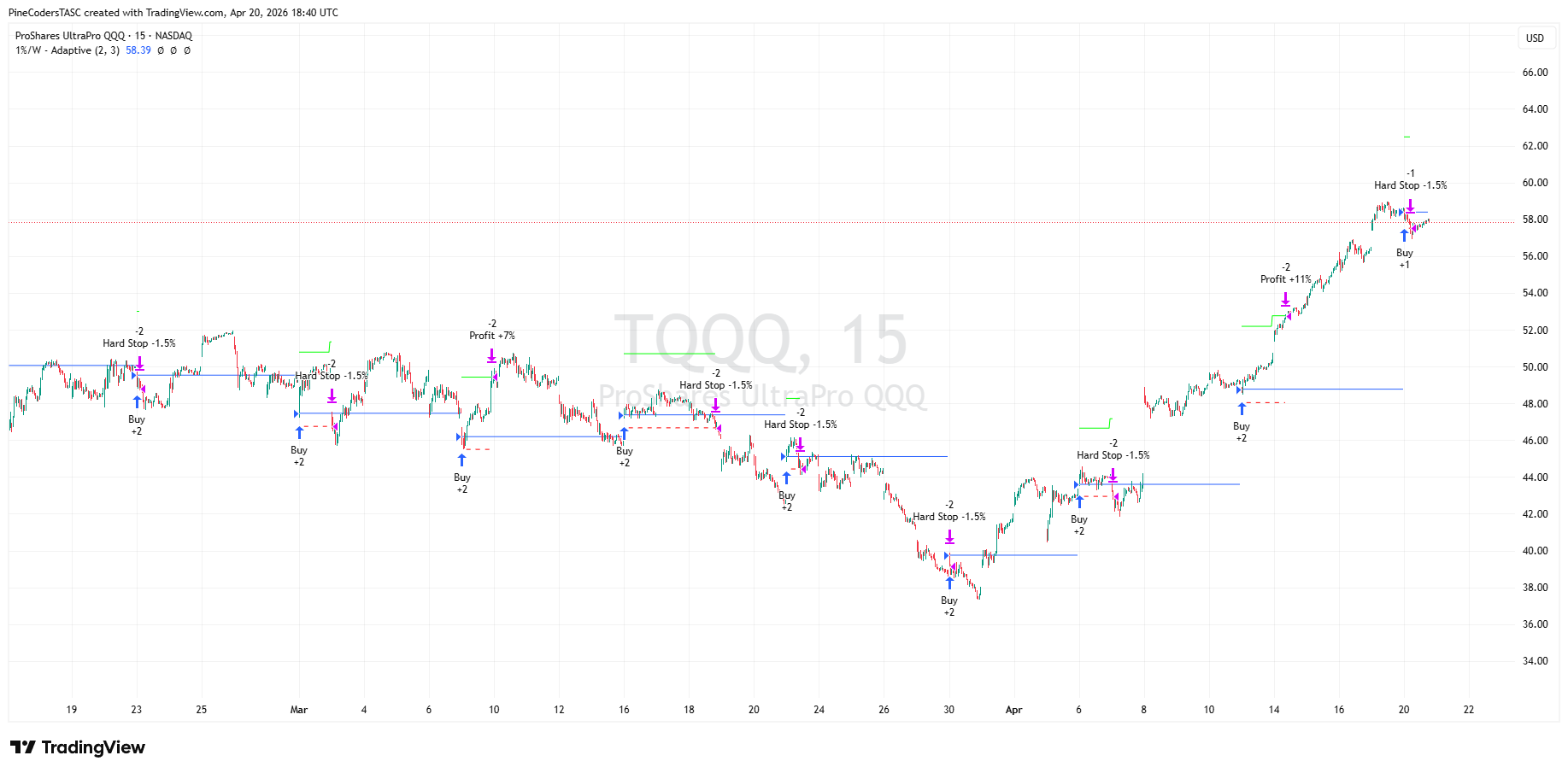
FIGURE 3: TRADINGVIEW. Here you see an example implementation of an exit strategy for the “one percent a week” adaptive strategy described in Dion Kurczek’s article in this issue.
The script is available on TradingView from the PineCodersTASC account: https://www.tradingview.com/u/PineCodersTASC/#published-scripts.
—PineCoders, for TradingView
https://www.TradingView.com
BACK TO LIST

NeuroShell Trader: June 2026
The exit variations discussed in Dion Kurczek’s article in this issue, “One Percent A Week: A High-Probability Weekly Trading Strategy For TQQQ, Part 2: Variations And Community Enhancements”, can be easily implemented in NeuroShell Trader on an intraday chart.
Select “New indicator...” from the insert menu and use the indicator wizard to create the following indicators for the original strategy:
MOPEN:	SelectiveLag( Open, And2(Monday Flag(Date), Not( Lag(Monday Flag(Date), 1))
MLIMIT:	CrossBelow( Close, Mul2(0.99, MOPEN))
MCOUNT:	CumSum( MLIMIT, 0 )
MCOUNT2:	Sub( MCOUNT,SelectiveLag(MCOUNT, MOPEN , 1) )
To create the “one percent a week” trading system with variations and enhancements, select “New trading strategy...” from the insert menu and enter the following in the appropriate locations of the trading strategy wizard:
BUY LONG CONDITIONS: [All of which must be true]
     MLIMIT
     A<=B( MCOUNT2, 1 )

LONG TRAILING STOP PRICES:
     PriceFloor%(Trading Strategy,1.5)

SELL LONG CONDITIONS: [1 of which must be true]
     PriceTarget%(Trading Strategy,7)
     IfThenElse( A<B(MinValEntryFill(Trading Strategy,Close,1), Mul2(0.995,EntryPrice(0))),
CrossAbove(Close,EntryPrice(0)), 0)
     And2(Friday Flag(Date),Time>=X(Date,3:50:00 PM))
     And2(A<B(Close,Open),PriceTarget%(Trading Strategy,2.5))
After entering the system conditions, you can also choose whether the parameters should be optimized. After backtesting the trading strategy, use the “Detailed analysis...” button to view the backtest and trade-by-trade statistics for the system.
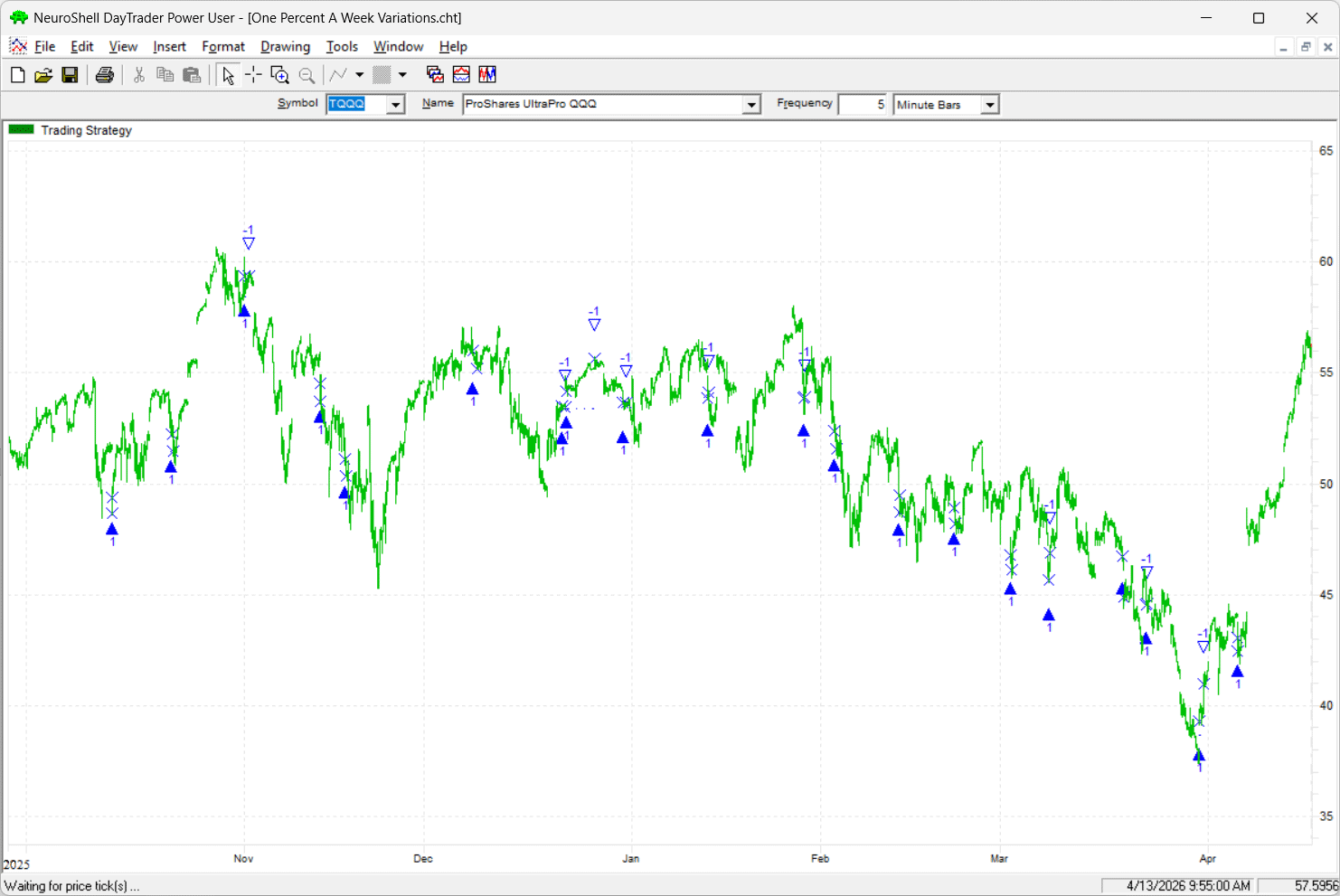
FIGURE 4: NEUROSHELL TRADER. This NeuroShell Trader chart demonstrates an exit strategy for the “one percent a week” trading system, as described in Dion Kurczek’s article in this issue.
Users of NeuroShell Trader can go to the Stocks & Commodities section of the NeuroShell Trader free technical support website to download a copy of this or any previous Traders’ Tips.
—Ward Systems Group, Inc.
sales@wardsystems.com
www.neuroshell.com
BACK TO LIST

AIQ: June 2026
AIQ code based Dion Kurczek’s article, “One Percent A Week: A High-Probability Weekly Trading Strategy For TQQQ, Part 2: Variations And Community Enhancements”, is provided in the downloadable code file. The code is also shown here.
Note that the code I am providing here does not implement the breakeven exit, so once a trade is entered it is held until it hits the profit target, or Friday’s close if the profit target is never hit. For this second version presented in part 2 (with the original version of the system presented in part 1 of the article in the March 2026 issue), I changed the system so that it always enters at the open on Monday when the Friday close is above a moving average (trend filter) and changed the profit target to use a multiple of the average true range (ATR).
! One Percent A Week
! Author: Dion KUrczek, TASC March & June 2026
! Coded by Richard Denning, 1/16/26 & 4/19/26

!*********BREAK EVEN EXIT NOT IMPLEMENTED*********

! ABREVIATIONS:
O is [open].
L is [low].
H is [high].
C is [close].
OSD is offsettodate(month(),day(),year()).

!INPUTS:
SMAlen is 50.
atrMult is 0.3.

! Return values for DayOfWeek() function:
Mon  if DayOfWeek()  = 0.
Tues if DayOfWeek()  = 1.
Wed if DayOfWeek()  = 2.
Thur if DayOfWeek()  = 3.
Fri    if DayOfWeek()  = 4.

! Get the open on Monday:
Mon_os is scanany( DayOfWeek()  = 0, 5) then OSD.
O_Mon is valresult(O,^Mon_os).

! Get the close on Friday:
Fri_os is scanany( DayOfWeek()   = 4, 5) then OSD.
C_Fri is valresult(C, ^Fri_os).

! Limit and profit targets:
LimEnt is O_Mon * 0.99.    ! Enter at Limit
PT is LimEnt * 1.01.           ! Exit at profit target

ExitPrice is iff(Mon and H>=PT,PT,
	iff(Tues and H>=PT,PT,
	iff(Wed and H>=PT,PT,
	iff(Thur and H>=PT,PT,
	iff(Fri and H>=PT,PT,^C_Fri))))).

CountEntries is countof(L <= LimEnt, DayOfWeek() + 1).
CountExits is countof(H >= PT, DayOfWeek()  + 1).

 ! Limit trades to one per week:
Buy if L <= LimEnt and CountEntries = 1 and CountExits <= 1.

!Exit at profit target or Friday's close:
Sell if H >= PT or DayOfWeek()=4.

 !Average True Range
Define Avg 10.
Dailyrange is [high]-[low].
YcloseL is abs(val([close],1)-[low]).
YcloseH is abs(val([close],1)-[high]).
Trange is Max(Dailyrange,Max(YcloseL,YcloseH)).
ATR is ExpAvg(Trange,Avg).
ATRpct is ATR/[close] * 100.
OnePct is C*0.01.

PTatr is O_Mon + ATR*atrMult.

ExitPrATR is iff(Mon and H>=PTatr,PTatr,
	iff(Tues and H>=PTatr,PTatr,
	iff(Wed and H>=PTatr,PTatr,
	iff(Thur and H>=PTatr,PTatr,
	iff(Fri and H>=PTatr,PTatr,^C_Fri))))).

!Buy at open then use ATR for profit target:
BuyOpen if Mon.
SellATR if C >= PTatr or Fri.

sma is simpleavg(C,SMAlen).
BuyOfilter if BuyOpen and valresult(C,1) > valresult(sma,1).

ShowValues if 1.
—Richard Denning
For AIQ Systems
rdencpa@gmail.com
BACK TO LIST
Originally published in the June 2026 issue of
Technical Analysis of STOCKS & COMMODITIES magazine.
All rights reserved. © Copyright 2026, Technical Analysis, Inc.