TRADERS’ TIPS
March 2026

For this month’s Traders’ Tips, the focus is Dion Kurczek’s article in this issue, “One Percent A Week: A High-Probability Weekly Trading Strategy For TQQQ.” Here, we present the March 2026 Traders’ Tips code with possible implementations in various software.
You can right-click on any chart to open it in a new tab or window and view it at it’s originally supplied size, often much larger than the version printed in the magazine.
Wealth-Lab code is provided by Dion Kurczek in the article, which S&C subscribers will find in the Article Code section of our website here.
The Traders’ Tips section is provided to help the reader implement a selected technique from an article in this issue or another recent issue. The entries here are contributed by software developers or programmers for software that is capable of customization.

TradeStation: March 2026
In the article “One Percent A Week: A High-Probability Weekly Trading Strategy For TQQQ, Part 1” in this issue, Dion Kurczek introduces a rules-based strategy designed to capture rebounds in TQQQ after early-week pullbacks. The strategy waits for a 1% dip below the week’s open, enters with a limit order, and exits either at a 1% profit, breakeven after a 0.5% drawdown, or at the end of the week.
The EasyLanguage implementation shown here closely mirrors the Wealth-Lab strategy, using weekday comparisons to detect the start of the week and assuming Friday as the final trading day by exiting at the close if neither the target nor breakeven has been reached. This simplifies the logic but does not account for holiday-shortened weeks, where Friday may not be the actual last trading session. To more accurately track intraday price movements, the strategy has been applied to a 1-minute chart.
Strategy: Reversion Index
{
	TASC MAR 2026
	One Percent A Week: A HighProbability Weekly Trading
	Strategy For TQQQ
	Dion Kurczek
}

inputs:
	EntryMult( 0.99 ),
	TargetMult( 1.01 ),
	BETriggerMult( 0.995 );

variables:
	WeekStartTrades( 0 ),
	WeekStartDate( 0 ),
	EntPrice( 0 ),
	OpenOfWeek( 0 ),
	TargetPrice( 0 ),
	BETrigger( 0 ),
	IsBEActive( false );

if DayOfWeek( Date ) < DayOfWeek( Date[1] )
 and Date <> WeekStartDate then
begin
	WeekStartDate = Date;
	WeekStartTrades = TotalTrades;
	OpenOfWeek = Open;
	EntPrice = OpenOfWeek * EntryMult;
	TargetPrice = EntPrice * TargetMult;
	BETrigger = EntPrice * BETriggerMult;
	IsBEActive = false;
end;

if Date >= WeekStartDate and WeekStartTrades = TotalTrades
 and MarketPosition = 0 then
begin
	Buy ("1% Dip") next bar at EntPrice limit;
end
else if MarketPosition = 1 then
begin
	if Low <= BETrigger then
		IsBEActive = true;

	if IsBEActive then
		Sell ("BrkEven") next bar at EntPrice limit
	else
		Sell ("Target") next bar at TargetPrice limit;

	if DayOfWeek( Date ) = 5 then
		SetExitOnClose;
end;
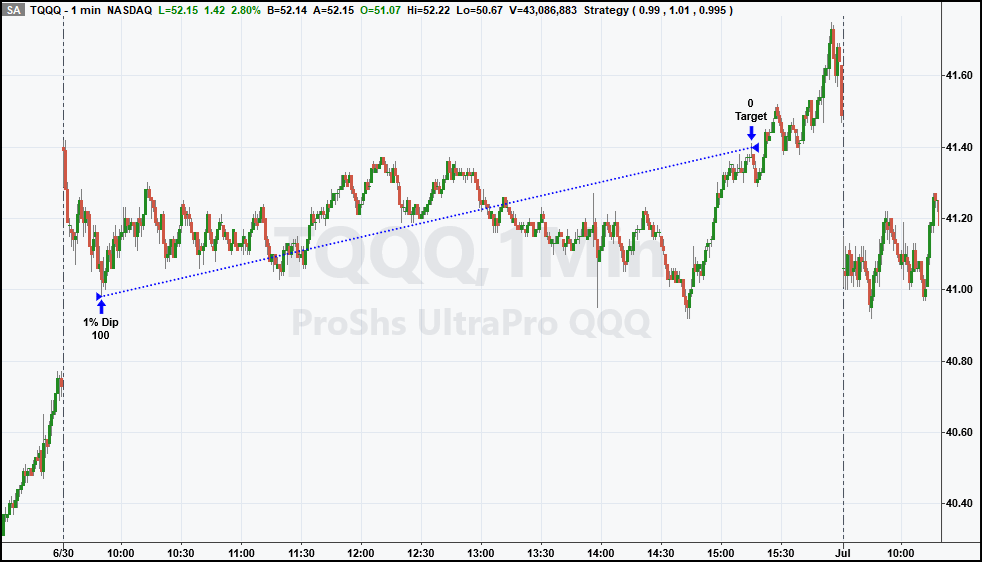
FIGURE 1: TRADESTATION. Shown is an example TradeStation 1-minute chart of TQQQ from June 30, 2025, illustrating the strategy in action with an entry on a 1% pullback from the weekly open and an exit at the 1% target.
This article is for informational purposes. No type of trading or investment recommendation, advice, or strategy is being made, given, or in any manner provided by TradeStation Securities or its affiliates.
—John Robinson
TradeStation Securities, Inc.
www.TradeStation.com
BACK TO LIST

MetaStock: March 2026
Dion Kurczek’s article in this issue, “One Percent A Week: A High-Probability Weekly Trading Strategy For TQQQ,” introduces a trading strategy for TQQQ. Here are some entry and exit signal formulas to create an expert advisor in MetaStock based on this strategy:
Buy Signal:
{buy}
nw:=ROC(DayOfWeek(),1,$)<0;
Omon:= ValueWhen(1, nw, O);
ePrice:= Int(100*(Omon * 0.99))/100; {truncates price to 2 decimal places}
sPrice:= ePrice * 0.995;
tPrice:= ePrice * If(LowestSince(1,nw, L)<sPrice, 1, 1.01);
hExit:= DayOfWeek() = 5 AND Hour()= 16; {hard exit on Friday Close}

Track:=
If(nw, 0, {reset tracking for the start of a new week}
If(PREV =0, {only look for trades if not already in one}
If((L<=ePrice) AND (hExit=0), 1, 0 ), {initiates a trade if the entry price is hit}
If(H >= tPrice, -1,
If(hExit, -2, PREV))));
Cross( track, 0.5)


Exit Signal:
{exitl}
nw:=ROC(DayOfWeek(),1,$)<0;
Omon:= ValueWhen(1, nw, O);
ePrice:= Int(100*(Omon * 0.99))/100; {truncates price to 2 decimal places}
sPrice:= ePrice * 0.995;
tPrice:= ePrice * If(LowestSince(1,nw, L)<sPrice, 1, 1.01);
hExit:= DayOfWeek() = 5 AND Hour()= 16; {hard exit on Friday Close}

Track:=
If(nw, 0, {reset tracking for the start of a new week}
If(PREV =0, {only look for trades if not already in one}
If((L<=ePrice) AND (hExit=0), 1, 0 ), {initiates a trade if the entry price is hit}
If(H >= tPrice, -1,
If(hExit, -2, PREV))));
Cross( 0, track )
—William Golson
MetaStock Technical Support
www.MetaStock.com
BACK TO LIST

RealTest: March 2026
Following is coding for use in the RealTest platform based on Dion Kurczek’s article in this issue, “One Percent A Week: A High-Probability Weekly Trading Strategy For TQQQ.”
Notes:
	Dion Kurczek "One Percent A Week: A HighProbability Weekly Trading Strategy For TQQQ (part 1)"
	TASC March 2026

Import:
	DataSource:	Norgate
	IncludeList:	TQQQ, SPY
	StartDate:	2010-02-11 // first day of TQQQ
	EndDate:	Latest
	SaveAs:	TQQQ.rtd

Settings:
	DataFile:	TQQQ.rtd
	StartDate:	Earliest
	EndDate:	2025-11-30 // to match author's results
	BarSize:	Daily
	AccountSize:	100000

Strategy: TQQQ_ONE_PCT
	Side:	Long
	EntrySetup:	Symbol = $TQQQ and not thisWeekEntry
	EntryLimit:	0.99 * thisWeekOpen
	ExitLimit:	Select(BarsHeld = 0, 0, // no exit limit on entry day
			C > 0.995 * FillPrice, Reason(1.01 * FillPrice, "1% profit"), // 1% target when near break even
			Reason(FillPrice, "breakeven")) // else breakeven target
	ExitRule:	Select(EndOfWeek, "end of week")
	ExitTime:	ThisClose // hard exit at close of last trading day of week if no ExitLimit fills

TestData:
	thisWeekOpen:	if(EndOfWeek, NextOpen, thisWeekOpen[1]) // look ahead to open for Monday's order or use Monday's open
	thisWeekEntry:	if(EndOfWeek, 0, thisWeekEntry[1] or Extern(@TQQQ_ONE_PCT, Shares > 0)) // enforce only one entry per week

Benchmark: SPY
	Side:	Long
	EntrySetup:	Symbol = $SPY

Charts:
	thisWeekOpen:	thisWeekOpen[1]
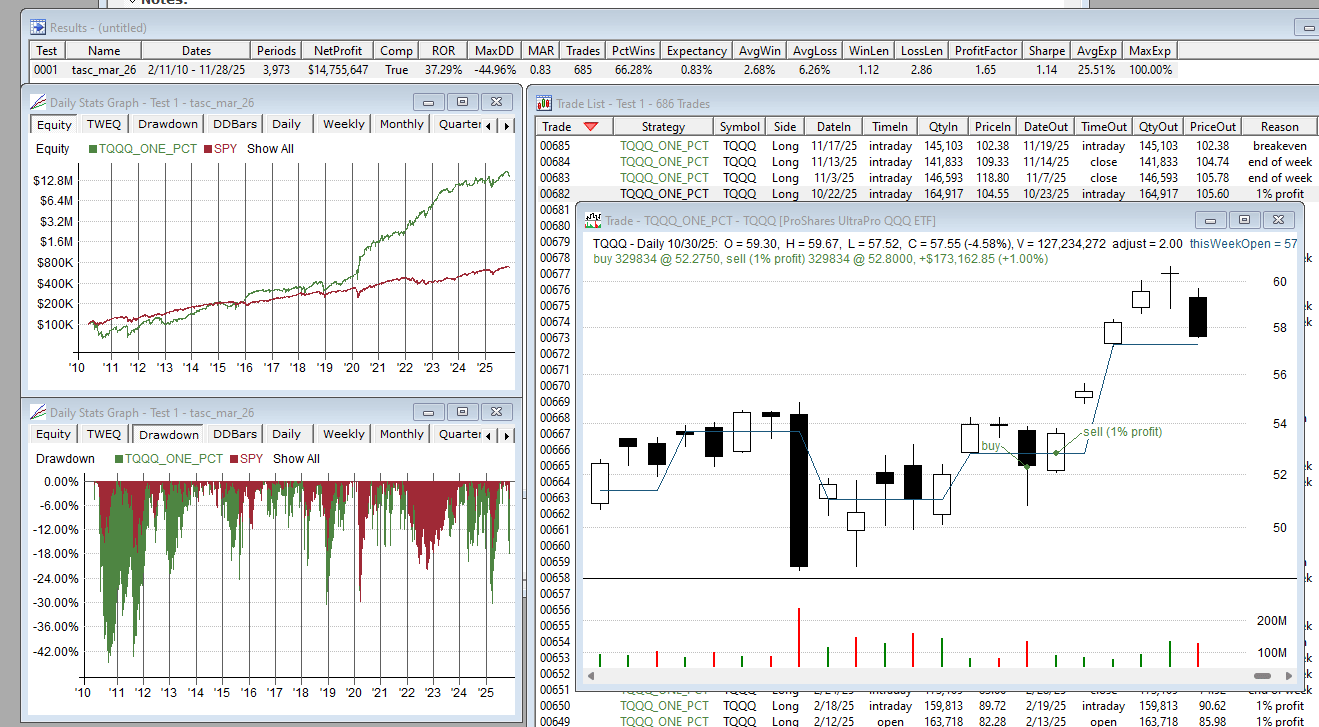
FIGURE 2: REALTEST. This example chart demonstrates an implementation of the “one percent a week” strategy on TQQQ.
—Marsten Parker
MHP Trading
mhp@mhptrading.com
BACK TO LIST

TradingView: March 2026
The TradingView Pine Script code presented here implements the “one percent a week” trading strategy for TQQQ as described by Dion Kurczek in his article in this issue, “One Percent A Week: A High-Probability Weekly Trading Strategy For TQQQ.”
//  TASC Issue: March 2026
//     Article: Trading Snapbacks In A Leveraged ETF
//              One Percent A Week: A High-Probability
//              Weekly Trading Strategy For TQQQ - Part 1
//  Article By: Dion Kurczek
//    Language: TradingView's Pine Script® v6
// Provided By: PineCoders, for tradingview.com

//@version=6
strategy("TASC 2026.03 One Percent A Week", "1%/W", overlay = true,
  initial_capital = 1000,
  default_qty_type = strategy.percent_of_equity,
  default_qty_value = 10)


//#region 1. Observe Weekly open price on monday.
var float wOpen = na
var float pt = na

bool newSession =
  dayofweek == dayofweek.monday and session.isfirstbar_regular

if newSession
    wOpen := open
    log.info("\nNew Week\n Open Price: " + str.tostring(open))


//#endregion

//#region 2. Set limit buy at a 1% dip from Monday open.

down1 = wOpen * 0.99

if newSession
    strategy.entry("buy",
    strategy.long,
    limit = down1)
    log.info("\nLimit Buy set: " + str.tostring(down1))
    pt := na

//#endregion

//#region 3. Once filled, set a 1% target on the next day.

newFill = ta.change(strategy.position_size) != 0
var sendPT = false
var beSent = false

if strategy.position_size > 0 and newFill
    sendPT := true
    beSent := false
    log.info("\nOrder Filled @ " + str.tostring(
      strategy.opentrades.entry_price(0)))

if sendPT == true and session.isfirstbar_regular and not beSent
    strategy.exit("profit",
      "buy",
      limit = strategy.position_avg_price*1.01,
      oca_name = "Order",
      comment = "Profit")

    pt := strategy.position_avg_price*1.01
    sendPT := false
    log.info("\nNext Day \nLimit Exit set: " + str.tostring(pt))

//#endregion

//#region 4. Risk management: Exit at breakeven after a -0.5%.

bet = strategy.position_avg_price*0.995 // Break Even Trigger

if low < bet and not beSent
    strategy.exit("profit",
      "buy",
      limit = strategy.position_avg_price,
      oca_name = "Order",
      comment = "Break Even")

    beSent := true
    pt := strategy.position_avg_price
    log.info("\nBreak Even Triggered")

//#endregion

//#region 5. Hard Exit at Friday close.

if dayofweek == dayofweek.friday and
      strategy.position_size > 0 and
      session.islastbar_regular and barstate.isconfirmed

    strategy.close_all("End Of Week", immediately = true)
    log.info("\nEnd of Week Closing Out")

//#endregion

//#region Exit Fill Logs

if newFill and strategy.position_size == 0
    switch
        beSent => log.info("\nBreak Even Filled @ " +
          str.tostring(strategy.closedtrades.exit_price(
          strategy.closedtrades-1)))
        => log.info("\nProfit Target Filled @ " +
          str.tostring(strategy.closedtrades.exit_price(
          strategy.closedtrades-1)))

//#endregion

//#region Plots

plot(newSession?na:wOpen,
  "Weehly Open",
  color.yellow,
  style = plot.style_linebr)

plot(newSession?na:down1,
  "Weekly 1% Dip",
  color.blue,
  style = plot.style_linebr,
  linestyle = plot.linestyle_dashed)

plot(strategy.position_size > 0?bet:na,
  "0.5% Drawdown",
  color.rgb(255,0,0),
  style = plot.style_linebr,
  linestyle = plot.linestyle_dashed)

plot(strategy.position_size > 0?pt:na,
  "Profit Target",
  color.rgb(0,255,0),
  style = plot.style_linebr,
  linestyle = plot.linestyle_solid)

//#endregion
An example implementation and output are shown in Figure 3.
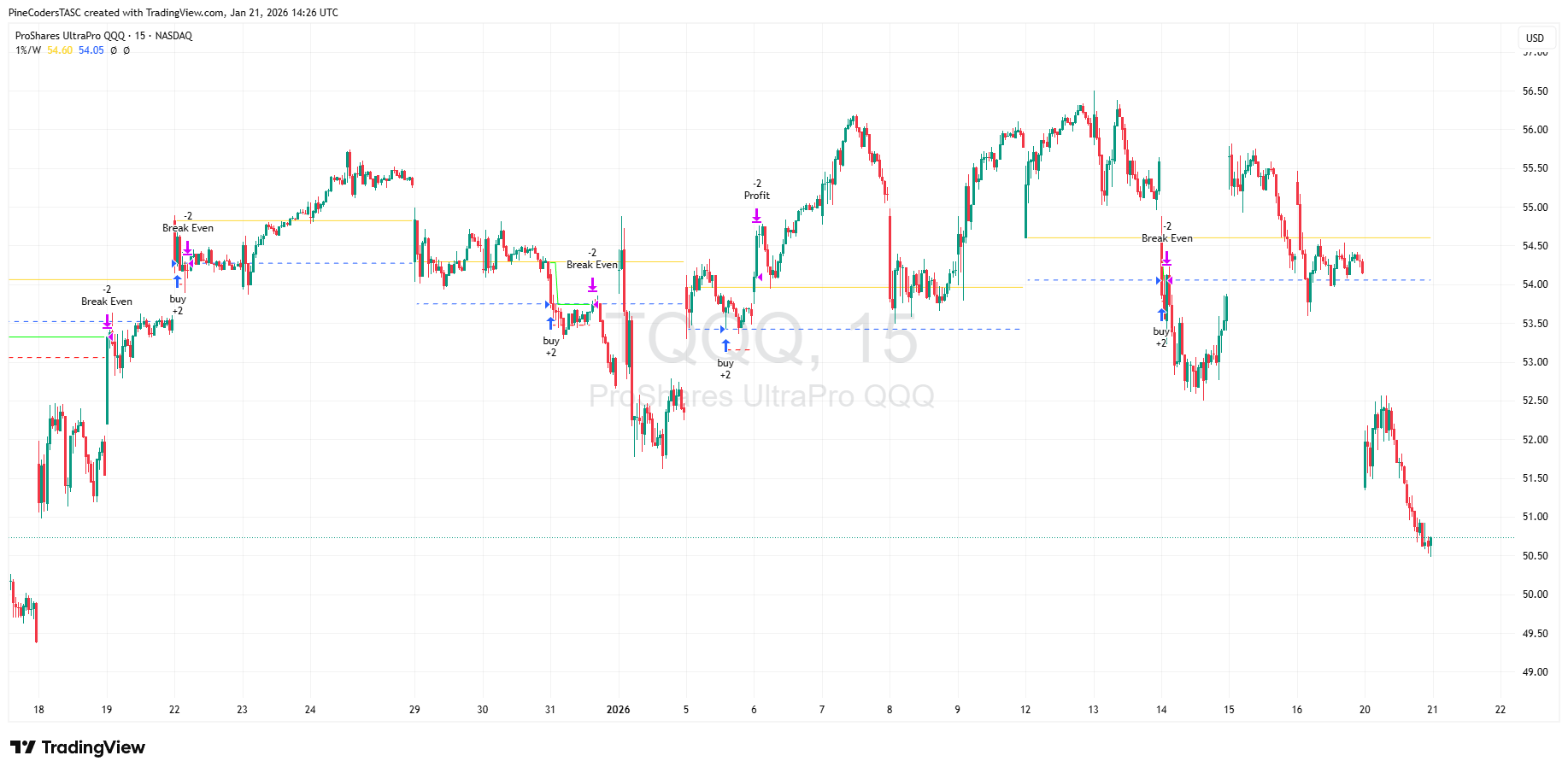
FIGURE 3: TRADINGVIEW. This shows an example of the strategy on TQQQ.
The code is available on TradingView from the PineCodersTASC account at: https://www.tradingview.com/u/PineCodersTASC/#published-scripts.
—PineCoders, for TradingView
www.TradingView.com
BACK TO LIST

NeuroShell Trader: March 2026
The “one percent a week” strategy described in Dion Kurczek’s article in this issue, “One Percent A Week: A High-Probability Weekly Trading Strategy For TQQQ,” can be easily implemented in NeuroShell Trader on an intraday chart. Select “New indicator …” from the insert menu and use the indicator wizard to create the following indicators:
MOPEN:	SelectiveLag( Open, And2(Monday Flag(Date), Not( Lag(Monday Flag(Date), 1))
MLIMIT:	CrossBelow( Close, Mul2(0.99, MOPEN))
MCOUNT:	CumSum( MLIMIT, 0 )
MCOUNT2:	Sub( MCOUNT,SelectiveLag(MCOUNT, MOPEN , 1) )
To create the “one percent a week” trading system, select New trading strategy … from the insert menu and enter the following in the appropriate locations of the trading strategy wizard:
BUY LONG CONDITIONS: [All of which must be true]
     MLIMIT
     A<=B( MCOUNT2, 1 )

SELL LONG CONDITIONS: [1 of which must be true]
     PriceTarget%(Trading Strategy,1)
     IfThenElse( A<B(MinValEntryFill(Trading Strategy,Close,1), Mul2(0.995,EntryPrice(0))),
CrossAbove(Close,EntryPrice(0)), 0)
     And2(Friday Flag(Date),Time>=X(Date,3:50:00 PM))
After entering the system conditions, you can also choose whether the parameters should be optimized. After backtesting the trading strategy, use the detailed analysis button to view the backtest and trade-by-trade statistics for the system.
An example chart is shown in Figure 4.
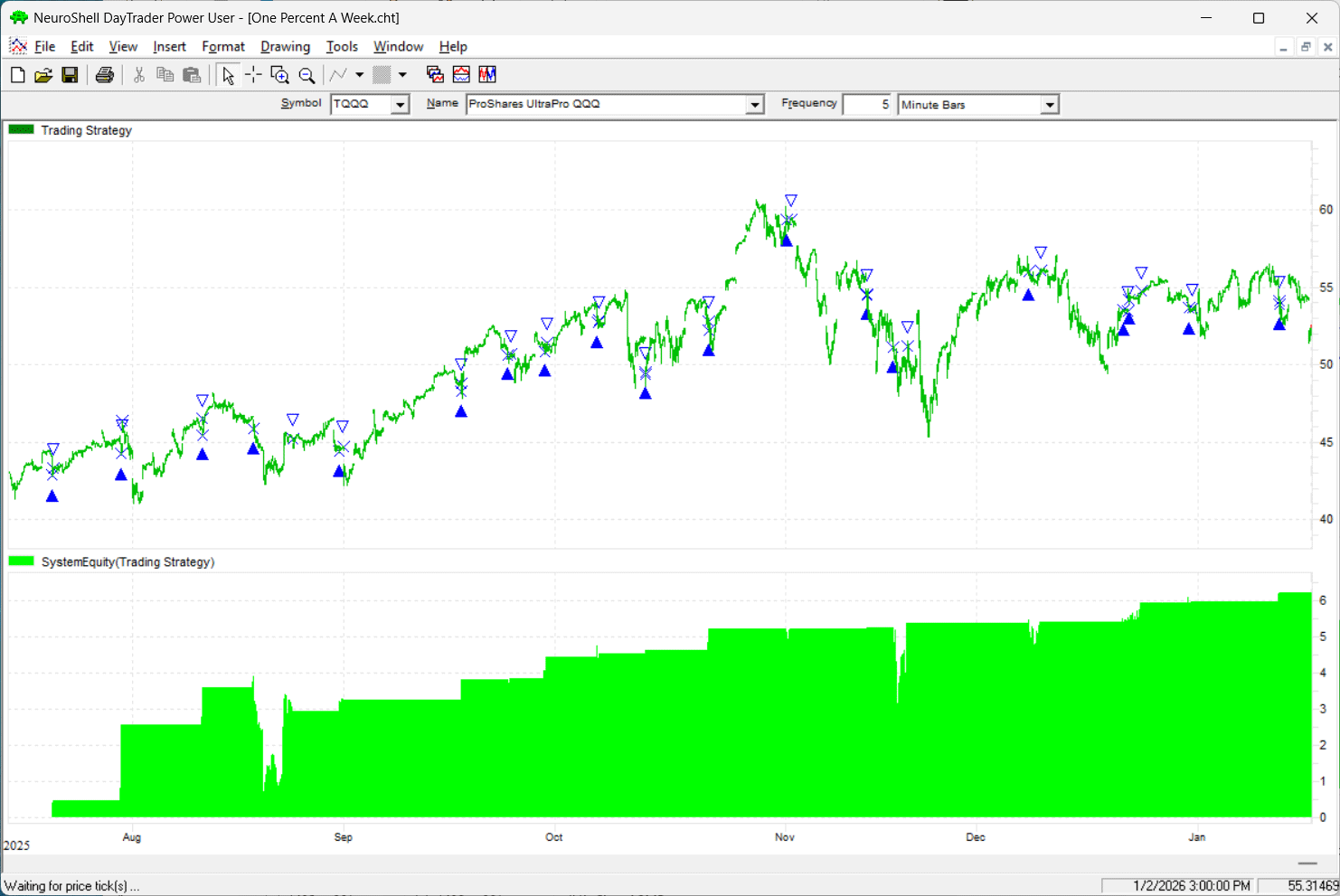
FIGURE 4: NEUROSHELL TRADER. This example chart demonstrates the “one percent a week” trading system and a sample equity curve.
—Ward Systems Group, Inc.
sales@wardsystems.com
www.neuroshell.com
BACK TO LIST

AIQ: March 2026
AIQ code based on Dion Kurczek’s article in this issue, “One Percent A Week: A High-Probability Weekly Trading Strategy For TQQQ,” for trading TQQQ is provided in the code file below. Note that the code provided does not implement the breakeven exit, so once a trade is entered, it is held until it hits the profit target or Friday’s close if the profit target is never hit.
! One Percent A Week (TQQQ)
! Author: Dion KUrczek, TASC March 2026
! Coded by Richard Denning, 1/16/26

!*********BREAK EVEN EXIT NOT IMPLEMENTED*********

! Abbreviations:
O is [open].
L is [low].
H is [high].
C is [close].
OSD is offsettodate(month(),day(),year()).

! Return values for DayOfWeek() function:
Mon if DayOfWeek()  = 0.
Tues if DayOfWeek()  = 1.
Wed if DayOfWeek()  = 2.
Thur if DayOfWeek()  = 3.
Fri if DayOfWeek()  = 4.

! Get the open on Monday:
Mon_os is scanany( DayOfWeek()  = 0, 5) then OSD.
O_Mon is valresult(O,^Mon_os).

! Get the close on Friday:
Fri_os is scanany( DayOfWeek()   = 4, 5) then OSD.
C_Fri is valresult(C, ^Fri_os).

! Limit and profit targets:
LimEnt is O_Mon * 0.99.    ! Enter at Limit
PT is LimEnt * 1.01.           ! Exit at profit target

ExitPrice is iff(Mon and H>=PT,PT,
	iff(Tues and H>=PT,PT,
	iff(Wed and H>=PT,PT,
	iff(Thur and H>=PT,PT,
	iff(Fri and H>=PT,PT,^C_Fri))))).

CountEntries is countof(L <= LimEnt, DayOfWeek() + 1).
CountExits is countof(H >= PT, DayOfWeek()  + 1).

 ! Limit trades to one per week:
Buy if L <= LimEnt and CountEntries = 1 and CountExits <= 1.

!Exit at profit target or Friday's close:
Sell if H >= PT or DayOfWeek()=4.

ShowValues if 1.
—Richard Denning
rdencpa@gmail.com
for AIQ Systems
BACK TO LIST

NinjaTrader: March 2026
The following NinjaTrader link provides a downloadable file to help implement some ideas from Dion Kurczek’s article in this issue, “One Percent A Week: A High-Probability Weekly Trading Strategy For TQQQ”:
Once the file is downloaded, you can import it into NinjaTrader 8 from within the control center by selecting Tools → Import → NinjaScript Add-On and then selecting the downloaded file for NinjaTrader 8.
You can review the source code in NinjaTrader by selecting the menu New → NinjaScript Editor → Indicators folder from within the control center window and selecting the file.
A sample chart is shown in Figure 5.
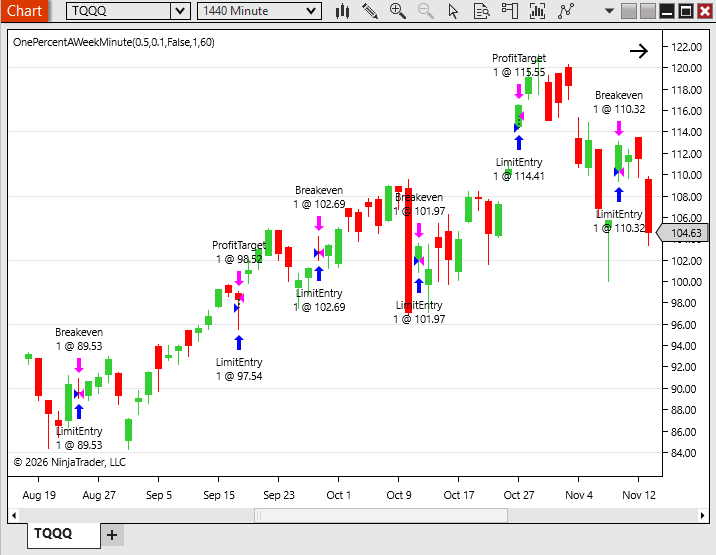
FIGURE 5: NINJATRADER. The trading system discussed is demonstrated on a chart of TQQQ.
NinjaScript uses compiled DLLs that run native, not interpreted, to provide you with the highest performance possible.
—NinjaTrader_Helom
NinjaTrader, LLC
www.ninjatrader.com
BACK TO LIST
Originally published in the March 2026 issue of
Technical Analysis of STOCKS & COMMODITIES magazine.
All rights reserved. © Copyright 2026, Technical Analysis, Inc.